Idea Tracker
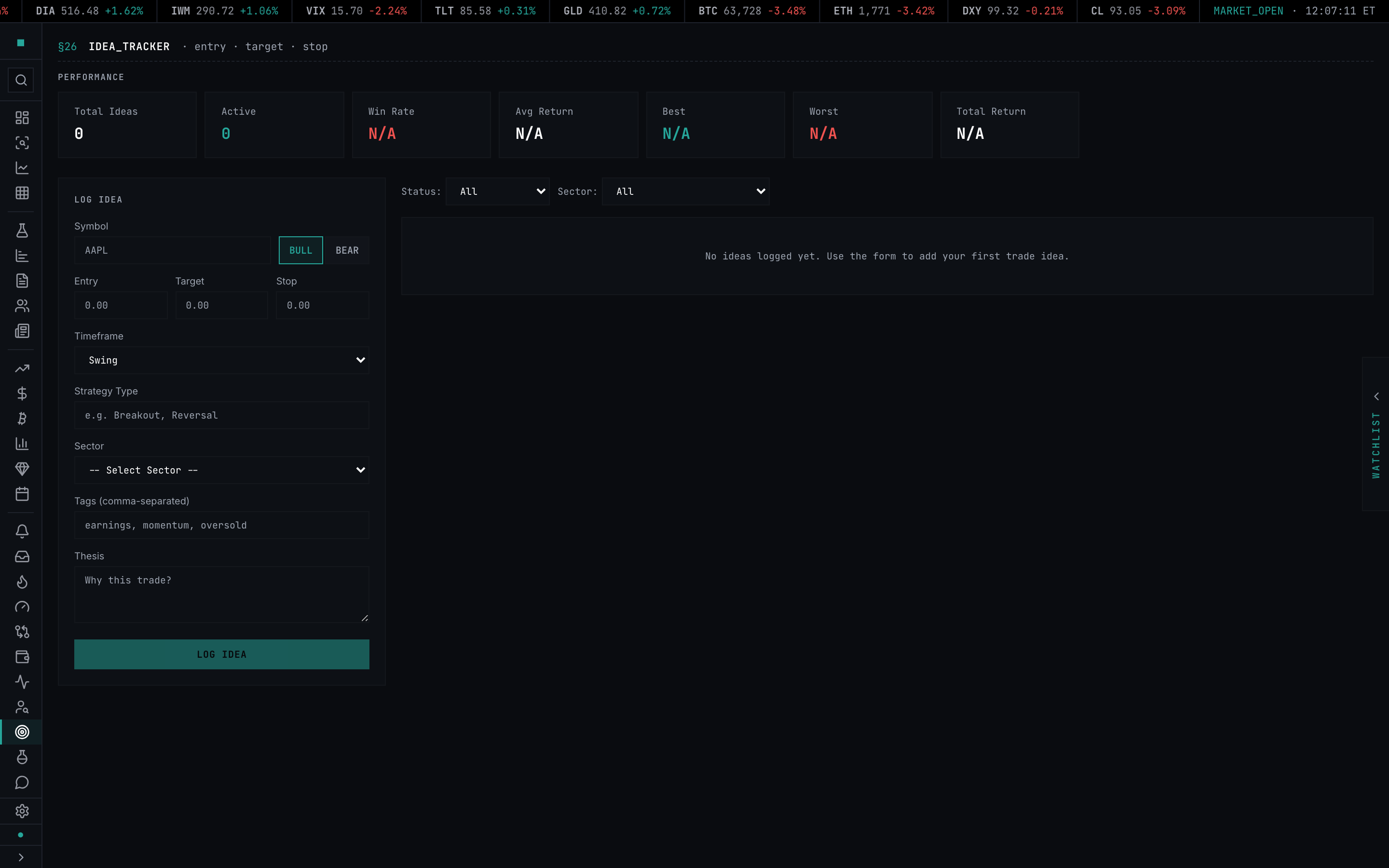
Idea Tracker logs trade ideas with entry, target, and stop levels — tracks live P&L from idea date, auto-flags hits and stops, computes win rate and expectancy across closed ideas, and one-click shares to the social feed.
Idea Tracker is the journal between "scanner caught it" and "I placed the trade." Log a thesis with entry, target, and stop levels, tag it by sector / strategy / arbitrary label, and the tracker watches the price and auto-marks the idea as hit_target, stopped_out, or leaves it active. Aggregate metrics — win rate, average return, best/worst, cumulative — roll up across the closed set so you can score your own forecasting honestly.
What it is
A client-side idea journal. State lives in useIdeaTrackingStore and persists to localStorage via Zustand persist — your ideas survive a refresh but live on this device. The store's updatePrices method is the engine: feed it a quote map and it walks every active idea, computes a fresh returnPercent (positive when price moves in the idea's direction), and flips the status to hit_target when the target is reached or stopped_out when the stop is breached. Closed ideas freeze in place.
Performance metrics (getMetrics) read off the closed-idea set: winRate, avgReturn, bestReturn, worstReturn, totalReturn, and a cumulativeReturns series for the chart. Active ideas count toward totalIdeas and activeIdeas but are excluded from the win/return rollups.
Each idea can be shared one-click to the Tapeboard social feed (socialApi.createIdea), which posts the entry, target, stop, timeframe, and tag set. Shared ideas show a cyan share badge instead of the share button — preventing re-posts of the same idea.
When to use it
Daily, after the scanner surfaces a setup — log it before you trade it. The thesis field is the honest test: if you can't write two sentences on why the trade works, the trade is a guess. Weekly, to scan the cumulative-return chart and see whether your closed ideas trend up or down — a tracker showing a six-month down-slope is feedback that your strategy isn't working, even if individual trades feel okay. Monthly, to filter by tag or strategy type and find which patterns actually pay — breakouts vs. reversals, earnings vs. macro, large-cap vs. small-cap.
Open it
- Path:
/idea-tracking - Shortcut: none — accessible from the
§TOOLSgroup in the sidebar - Tier-gate: Free — the entire tracker is unlocked
How to use it
- Open
/idea-tracking. The page splits into the performance dashboard up top, the cumulative-returns sparkline (visible once you have at least two closed ideas), theLOG IDEAform on the left, and the filtered ideas list on the right. - Log an idea: enter
Symbol, clickBULLorBEAR, fill inEntry,Target,Stop(all required). Pick aTimeframe—Intraday,Swing,Position,Long term. Add optionalStrategy Type(free-text, e.g., "Breakout", "Reversal"),Sector, comma-separatedTags, and aThesis. HitLOG IDEA. - Filter the list with the controls above the table:
Status(All/Active/Hit Target/Stopped Out/Expired),Tag,Strategy,Sector. Combine filters freely. - Click any tag chip below the list to toggle a filter on that tag. Click the same chip again to clear it.
- Hover the
[i]icon on any row to see the thesis tooltip. - Hit the share icon on any row to push the idea to your public feed. The icon flips to a cyan filled badge once shared and prevents re-posting.
- Hit the
×on any row to remove an idea permanently. There is no undo.
Fields
| Form field | What it is |
|---|---|
Symbol | Ticker, uppercased on submit |
Direction | BULL (price up = positive return) or BEAR (price down = positive return) |
Entry | Price at which the idea is opened — return is computed off this baseline |
Target | Price at which the idea auto-flips to hit_target |
Stop | Price at which the idea auto-flips to stopped_out |
Timeframe | intraday / swing / position / long_term — descriptive only, does not auto-expire |
Strategy Type | Free-text label — used as a filter facet |
Sector | Picker — used as a filter facet |
Tags | Comma-separated free-text — each becomes a filter chip and dropdown option |
Thesis | Free-text — shown on hover via the row's [i] indicator |
| Status badge | What it means |
|---|---|
Active (accent) | Idea is being tracked — price has not hit target or stop |
Hit Target (green) | Live price reached the target — return frozen at the target level |
Stopped Out (red) | Live price breached the stop — return frozen at the stop level |
Expired (muted) | Set manually — there is no automatic time-based expiration today |
| Metric card | What it is |
|---|---|
Total Ideas | All ideas logged |
Active | Ideas currently being tracked |
Win Rate | Closed ideas with positive return ÷ all closed ideas |
Avg Return | Mean of closed-idea return percents |
Best / Worst | Max / min of closed-idea returns |
Total Return | Sum of closed-idea returns (not compounded — additive) |
Limits
- Ideas persist to
localStorageon the device they were logged on. No cross-device sync — clearing browser data deletes your ideas - Status transitions are price-driven only — there is no automatic time-based expiration. Old
Activeideas remain active until you remove them manually or set their status via the store - Live-price updates depend on the store's
updatePricesbeing fed quotes from another part of the app — if no surface is calling it for a symbol, that idea'scurrentPricestays at the entry value and the return reads0.00% - Total Return is additive, not compounded — twenty +10% ideas read as +200%, not as a portfolio's geometric compound
- The share button posts to the Tapeboard social feed via
socialApi.createIdea. Once shared, an idea cannot be re-shared — the cyan badge replaces the button permanently - Cumulative-returns chart renders only when there are at least two closed ideas. Before that it shows the "No closed ideas yet" empty state
- The thesis field has no length limit but the
[i]tooltip is rendered via native browser title attribute — very long thesis text wraps unpredictably across browsers - Removing an idea is permanent — no soft delete, no archive
Troubleshooting
I logged ten ideas and Avg Return shows N/A. All ten are still Active. Win-rate, avg-return, best, worst, and total-return are computed off closed ideas only — until the live price hits a target or stop on at least one idea, those cards stay at N/A.
An idea I logged for AAPL shows +0.00% even though AAPL has moved. The store's updatePrices hasn't been called with a quote for AAPL since you logged the idea. Open /charts?symbol=AAPL or /research/AAPL in another tab — the page surfaces that load quotes will refresh the tracker on next navigation. A dedicated periodic-quote-update job for the tracker is on the roadmap.
My ideas disappeared after clearing cookies. Persistence is localStorage, which is cleared by "clear cookies and site data" in most browsers. There is no server-side backup of unshared ideas; shared ideas live in your social feed regardless.
§ERR / SHARE · request failed. The socialApi.createIdea call failed — usually a transient network error or you're not authenticated. The button auto-resets to the share icon after two seconds; try again.
The share badge stuck on sharing… and never resolved. Refresh the page. The component-local share state isn't persisted across refreshes — if the call actually succeeded on the server, the next page load will pull the canonical shared: true from the store and render the cyan badge.
I want to mark an idea as expired without it having hit my stop. There is no UI control for this today — you can either let it sit Active or remove it. Setting custom status manually is on the roadmap.
The cumulative-returns chart is flat across the whole window. Either all your closed ideas net to zero (genuinely flat) or only one idea has closed (the chart needs at least two points to draw the line). Log a few more ideas and let them resolve.
Tag filter dropdown is empty. The dropdown only populates from tags present on already-logged ideas — log one idea with a tag and the dropdown appears.